ClassPulse — Live Class Quizzes
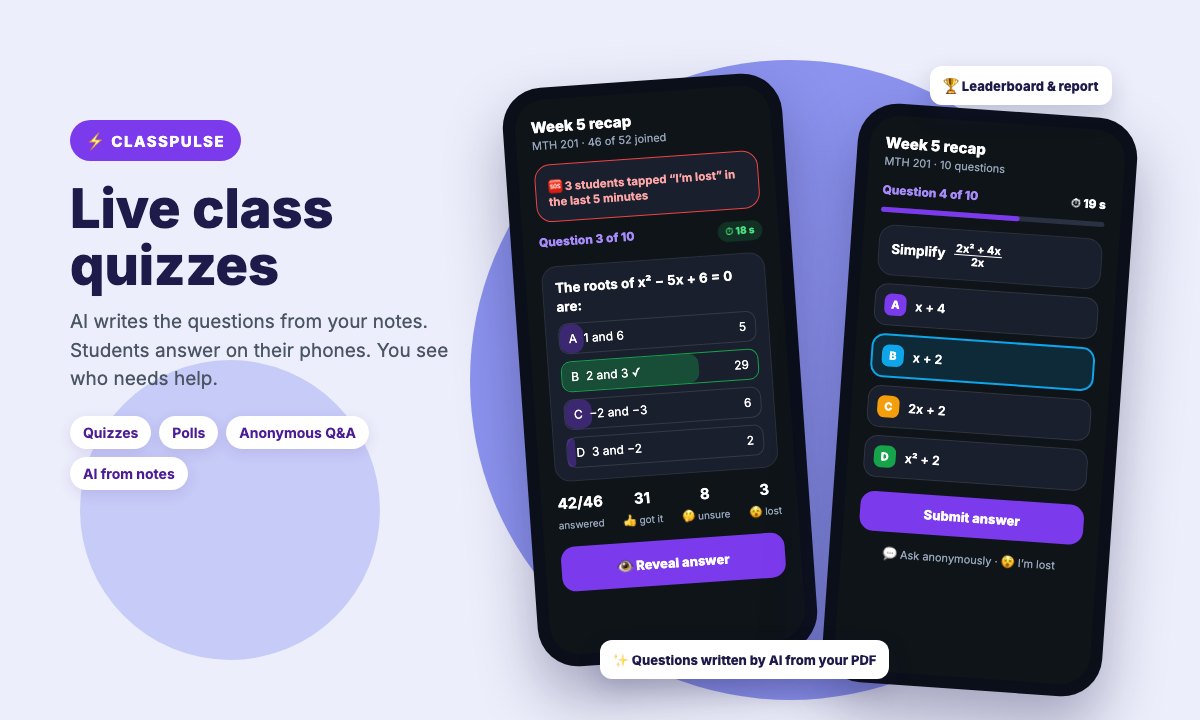
Attendance tells a lecturer who was in the room. ClassPulse tells them who was actually following. It turns any lecture into a live, two-way class: the lecturer runs quick quizzes, polls and anonymous Q&A from the same Attenova app, and students answer on their phones in one tap — no codes, no extra app, no sign-up.
Questions in minutes, not hours. Most lecturers don’t want to type questions — especially equations — on a phone. With ClassPulse they can type a topic (“Quadratic equations, 200 level, 10 questions”), upload their notes or teaching guide as a PDF, Word document or text file, or simply take a photo of handwritten notes or a textbook page. AI writes the questions, with formulas displayed properly, and the lecturer reviews, edits or drops each one before students ever see it. Typing questions yourself is always available too, with a live preview for maths.
Two ways to run it. Live in class: the lecturer shows one question at a time and watches the answers come in, sees when students tap “I’m lost”, reveals the right answer with an explanation, then moves on. Self-paced: students take the quiz on their own before a due date — ideal for homework and revision.
Results that help you teach. After every session the lecturer gets a report: the class average, students grouped as excelling, average or needing help, each student’s weak topics, the hardest questions and the most common wrong answer, and a “re-teach first” list. AI can mark short answers and write a short teaching summary. Everything downloads to Excel or PDF.
Included Features
- AI questions from a topic, PDF, Word or text notes, or a photo
- Review and edit every AI question before it’s used
- Multiple choice, true/false, short answer and polls
- Maths and formulas displayed properly
- Live in class, or self-paced with a due date
- Server-enforced timer on every question
- Answer options shuffled per student
- Live answer bars and an “I’m lost” alert
- Anonymous student questions with upvotes
- Leaderboard, score and answer review for students
- Report with weak topics and a re-teach list
- AI marking of short answers and teaching summary
- Question bank per course to reuse
- Option to allow only students marked present
- Overview for admins, HODs and deans
- Excel and PDF downloads
The Challenge
Lecturers usually find out who didn’t understand a topic when exam results come back — too late to help. Asking “any questions?” rarely works in a big hall, quizzes take hours to prepare and mark, and typing equations into a phone is painful. Students who are lost often stay quiet.
How Attenova solves this
ClassPulse gives lecturers a live pulse of the class with almost no preparation: AI drafts the questions from material they already have, students answer in seconds on the phone they already use for attendance, and the system flags who is struggling and which topics to revisit — after every class, not at the end of the semester. Only enrolled students with an activated account can join, the server enforces each question’s time limit, and lecturers can limit a quiz to students marked present in that class.
Common questions about this feature
No. They can type a topic, upload their notes or teaching guide (PDF, Word .docx or text), or take a photo of handwritten notes or a textbook page, and AI writes the questions. They review and edit every question before students see it. Typing questions is also available, with a live preview for equations.
Yes. Formulas, fractions, powers and symbols are displayed properly on every phone, and the AI writes mathematics in that format too.
No. ClassPulse is part of the Attenova app and web app. Students get a notification when a quiz starts and join with one tap from their dashboard.
It’s much harder. Each question has a timer enforced by our server, answer options are shuffled for every student, right answers are only shown after the question closes, and the lecturer can allow only students marked present in that class.
Nothing extra. ClassPulse is included in the student activation — students who have activated their account can use it, and the university pays nothing.
ClassPulse is switched on per university by the Attenova team. Contact us and we’ll turn it on and show your lecturers how to use it.
No student names or personal details are sent. Only the lecturer’s material is used to write questions; for marking short answers and the teaching summary, only the answers and the class’s overall numbers are used.
Related Services
Live Attendance Dashboard
See who is in class as they check in.
School-wide Analytics
Attendance and performance across courses.
GPS-Verified Attendance
The check-in ClassPulse builds on.