In most Nigerian universities, leaving campus for a weekend, a hospital visit or a family emergency means a paper exeat form, a signature from the right office, and a gate log that nobody can search afterwards. If the form is lost, there is no record that the student was ever allowed out — and no easy way for the hostel to know that an empty bed is excused.
Attenova moves the whole journey onto the student’s phone, from asking for leave to walking back through the gate. Here is how it works.
1. Ask for leave in the app

The student opens Leave / Excuse, chooses the type of leave, picks the dates, writes a short reason and attaches proof — a photo of a medical note or a letter is enough. Each type of request goes straight to the person who should decide it:
- General leave (leaving campus) goes to the DSA, and covers classes, chapel and hostel for those days.
- Class leave goes to the course’s lecturer.
- Chapel leave goes to the Chaplain.
- Hostel leave goes to the student’s hostel managers.
- Exam leave goes to the Exam Officer.
If one of those roles hasn’t been filled yet at a university, the request goes to its administrators instead, so nothing is ever left waiting with nobody to answer it.
2. Fair limits, set by the university
To keep leave fair, each type has a limit per semester. By default a student can make 3 general leave requests (each up to 14 days), 6 class, 4 chapel, 6 hostel and 2 exam requests a semester. The university can change these numbers, and the form always shows the student how many they have left.
3. Approved leave is excused, never absent
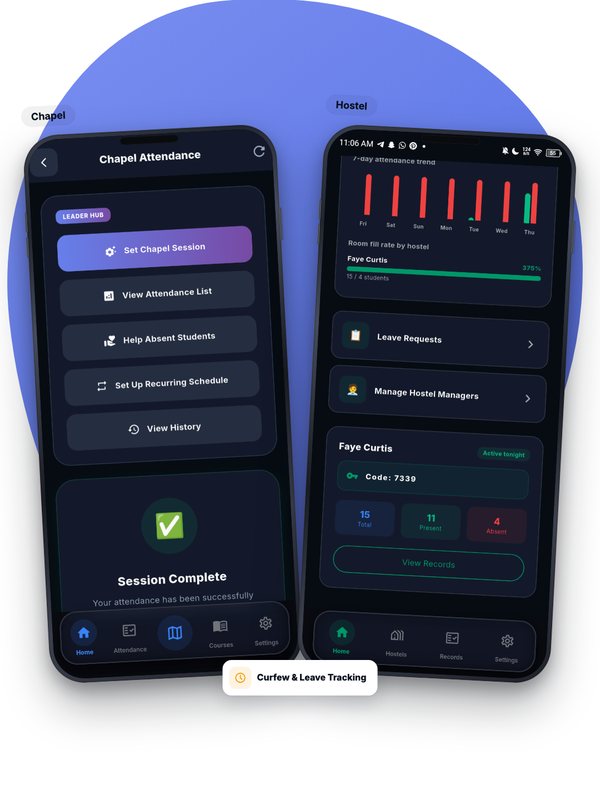
The decision arrives as a notification and an email. Once a request is approved, the student is marked excused for those dates rather than absent, the days don’t count against their attendance percentage, and they stop getting class, bed-check and devotion reminders while they are away. When general leave is approved, the student’s hostel managers are told automatically, so an empty bed is never a surprise.
4. The exit pass

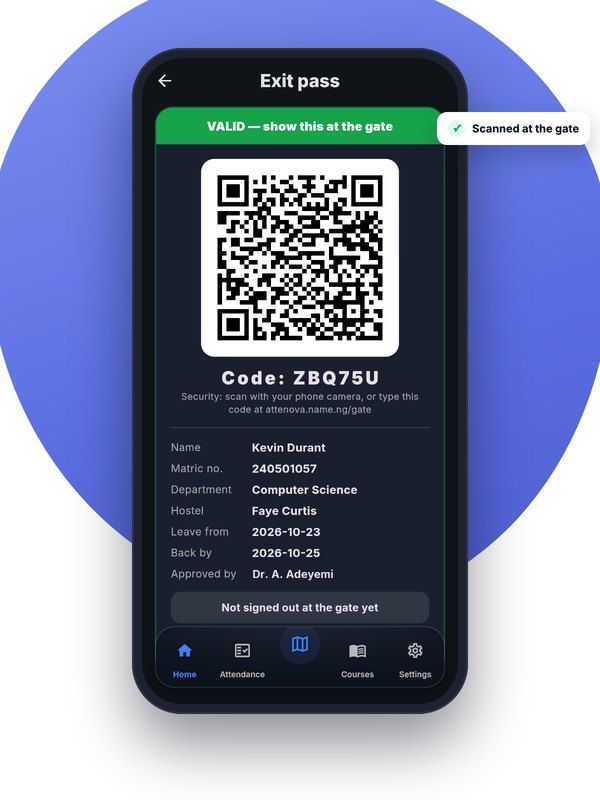
Approved general leave also gives the student an exit pass in the app: a QR code and a short code, with their name, matric number, department, hostel, the dates of their leave and who approved it.
At the gate, security scans the QR code with any phone camera — no app or account needed — or types the short code. The page shows at a glance whether the pass is valid, not yet valid, expired or cancelled, together with the student’s details to check against their ID card. With the school’s gate PIN, the guard then signs the student out, and back in when they return.
5. The DSA always knows who is away
Every sign-out and sign-in is recorded, so the DSA can see at any moment who is away, who is due back today, and who is overdue. A student who should have been back yesterday stands out immediately, instead of being discovered days later.
6. Going home for a break
Short breaks such as Easter work even more simply. When a break is coming, students see a banner in the app. Those travelling tap I’m going home: it is approved automatically, excuses their bed checks, devotions and chapel for the break, and gives them a gate pass. A student who forgets to tap before leaving can still tap later, and it covers the whole break — the hostel team or the DSA can reject it if the student was actually on campus.
Why it matters
For students, leave stops being a chase for signatures. For hostel managers and the DSA, every absence has a reason and a record. And for the university, the gate log finally matches the attendance register — on the phones everyone already carries.
Want to see leave and exit passes working at your university? Get in touch and we’ll arrange a demo.

Attenova Team
We build Attenova at DWS CODES LTD — GPS- and face-verified attendance for classes, chapel, exams, events and hostels, at no cost to universities.
Leave a Comment